Ever After — The Complete Interactive Wedding Planner

Plan your whole wedding in one beautiful place, without the overwhelm.

Ever After brings your checklist, budget, guests, RSVPs, seating, vendors, wedding-day plans and more together, so you can feel organised, in control and actually enjoy being engaged.

US$19 launch price​✦​One-time purchase​✦​No subscription

Ever After, The Complete Interactive Wedding Planner by Grace and Pride, shown on a laptop and phone among blush roses, gypsophila and wedding rings
Sound familiar?

Your wedding plans shouldn’t have to live in your head.

Wedding planning often ends up spread across notes, screenshots, messages, emails, spreadsheets and saved inspiration.

Dozens of little details, all competing for the same bit of mental space.

NotesGuest names in one place.
Sticky noteQuestions for the venue written somewhere else.
MessagesRSVPs buried in messages.
budget_final_v3Budget numbers in Notes or a spreadsheet.
InboxVendor quotes lost in emails and DMs.
Saved pinsPinterest inspiration everywhere.
To doSeating still to work out.
PhotosScreenshots all over your phone.
timings.docxWedding-day timings in another document.
Meet Ever After

Your whole wedding. One beautiful planner.

Checklist, budget, guests, events, seating, vendors and the wedding day itself, brought together in one calm place.

The Ever After Home screen for Sofia and James: their wedding on Friday, May 28, 2027, 242 days to go, with every planner tab along the bottom
Actual Ever After screens are shown throughout using sample wedding data. Some views are cropped for clarity.
Checklist

“What am I forgetting?”

Never wonder what you’re forgetting.

See what’s done, what’s next and the details you need to remember, without carrying the whole wedding in your head.

Every tick is one less thing to keep thinking about.

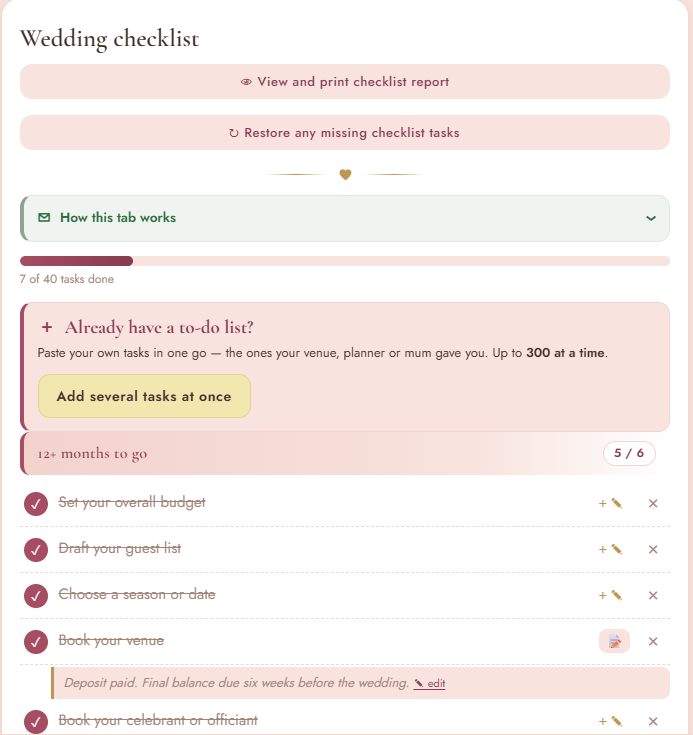
Your wedding checklistProgress, planning stages and notes beside the task.
The Ever After wedding checklist: 7 of 40 tasks done, the 12+ months to go stage with five tasks ticked, and the note under Book your venue: Deposit paid. Final balance due six weeks before the wedding.
Budget

“What have we actually spent, and what’s still owing?”

Know exactly where the wedding budget stands.

Keep your target, real costs, payments and what is still owing in one clear financial picture.

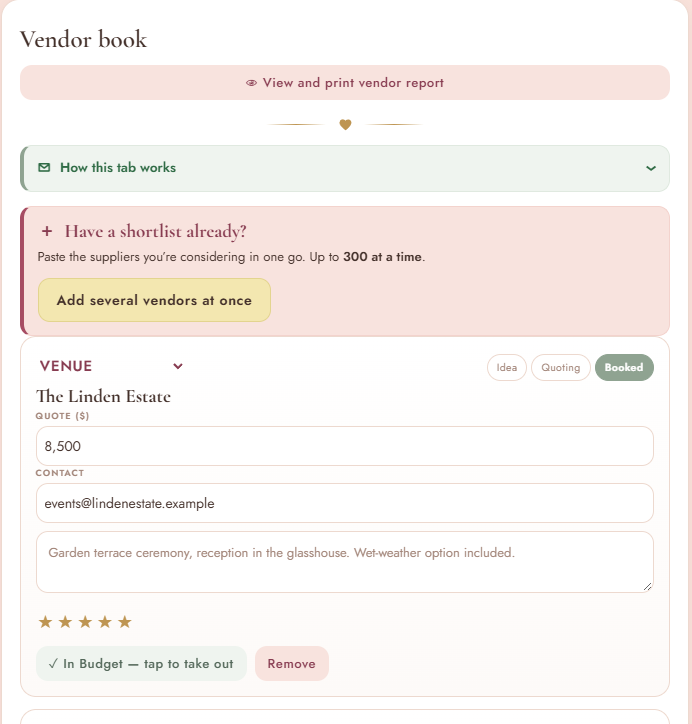
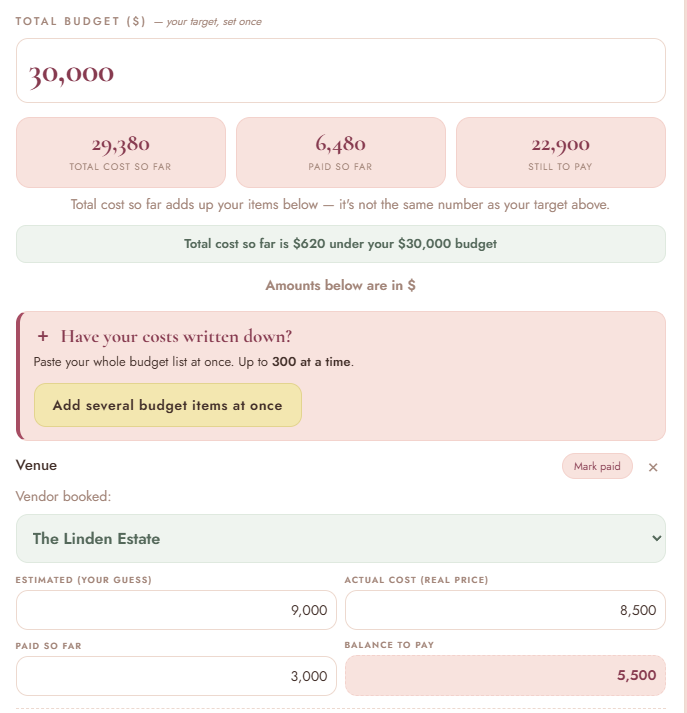
From Vendor Book to BudgetThe Linden Estate is marked Booked and In Budget in the Vendor Book, then appears inside the Venue budget item with its actual cost, amount paid and balance left.
The Ever After Vendor book: The Linden Estate, Venue, quote 8,500, marked Booked, with In Budget, tap to take out
See the whole pictureSee your target budget, total cost, what’s already paid and what is still owing, with the booked vendor attached to the real Budget item.
The Ever After Budget: total budget 30,000, total cost so far 29,380, paid so far 6,480, still to pay 22,900, and the Venue item with Vendor booked: The Linden Estate, estimated 9,000, actual cost 8,500, paid so far 3,000, balance to pay 5,500

You choose which quotes go into your Budget. Nothing is added without you.

Guests & events

“Who’s invited to what?” “Who’s actually coming?” “Any dietary needs I need to remember?” “Where am I going to seat everyone?”

One guest list. Every wedding event.

Keep invitations, RSVPs, dietary needs, seating and handover details connected, from the first guest list to the final report.

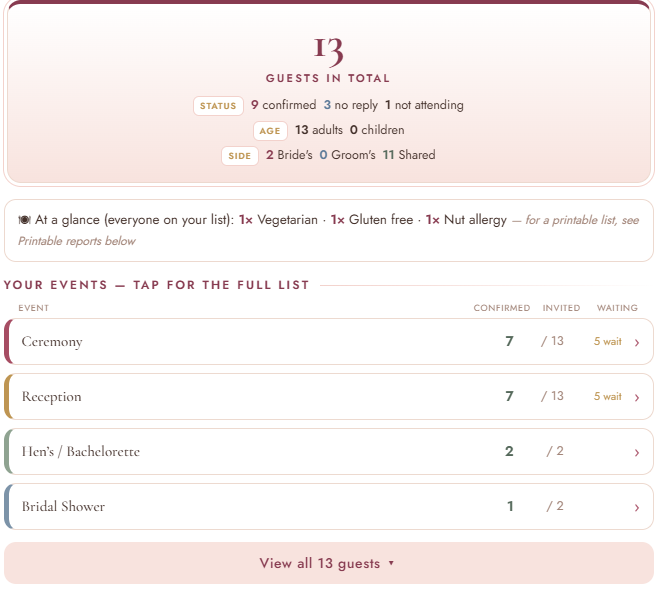
See every event at a glanceCeremony, Reception, Hen’s / Bachelorette and Bridal Shower each stay organised separately.
Ever After guest overview: 13 guests in total, 9 confirmed, 3 no reply, 1 not attending, dietary needs at a glance, and each event listed with its confirmed and invited numbers: Ceremony, Reception, Hen's or Bachelorette and Bridal Shower

Follow one guest through the plan

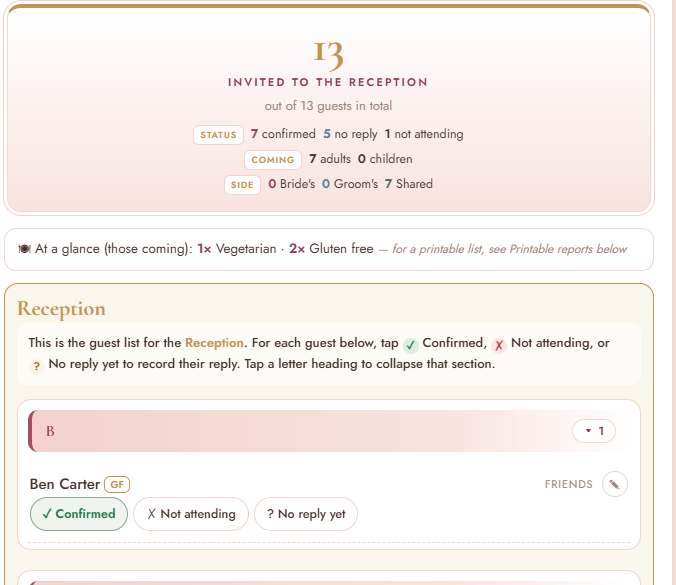
Track confirmations and dietary needsBen Carter is confirmed for the Reception, and his gluten-free requirement is already recorded.
Reception RSVPs: 13 invited, 7 confirmed, dietary needs at a glance of 1 vegetarian and 2 gluten free, and Ben Carter, tagged GF, marked Confirmed
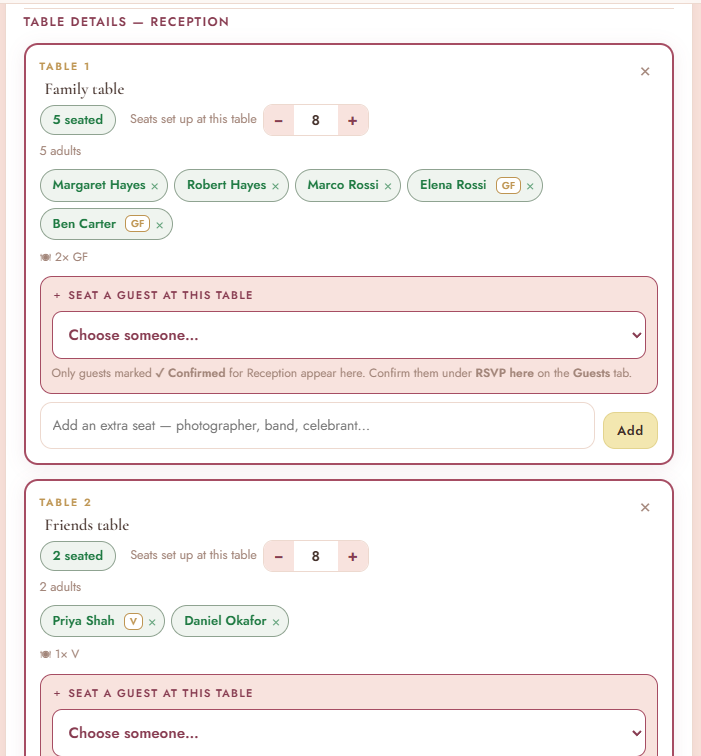
Seat confirmed guests onlyOnly confirmed reception guests appear in the seating plan, so table planning stays clean and accurate.
Reception table details: Table 1, Family table, with five guests seated including Ben Carter tagged GF, 2 gluten free at the table, and the line: Only guests marked Confirmed for Reception appear here
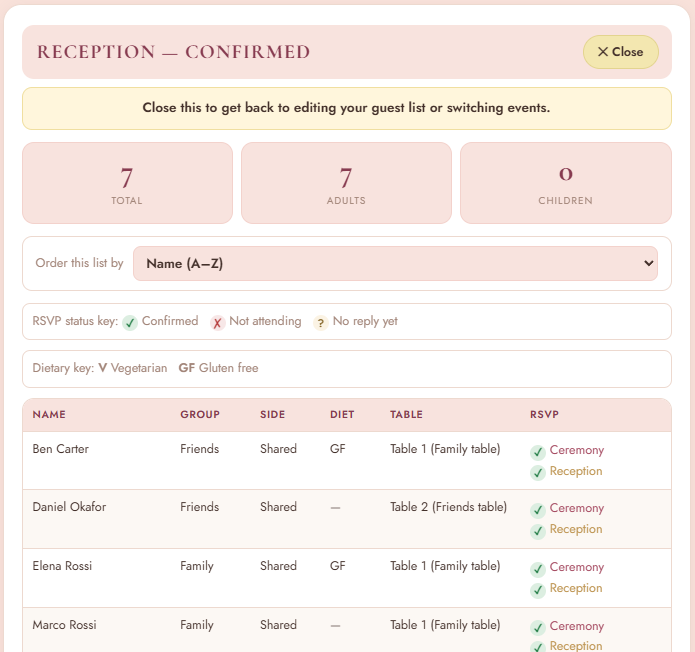
Hand over the right reportBen’s gluten-free requirement and Table 1 placement are already there for your venue, caterer or coordinator.
Reception, Confirmed report: 7 guests, and Ben Carter, Friends, Shared, diet GF, Table 1 (Family table), confirmed for Ceremony and Reception

And when the venue or caterer asks for the final information? It’s ready to print or save.

Organise it once. Give the right information to the right person.

The wedding day

“Who needs to be where, and when? And how am I supposed to keep track of it all?”

Build the day. Hand over the plan.

Keep the sequence of the day together as you plan, then turn that work into a clear run sheet for the people helping the wedding happen.

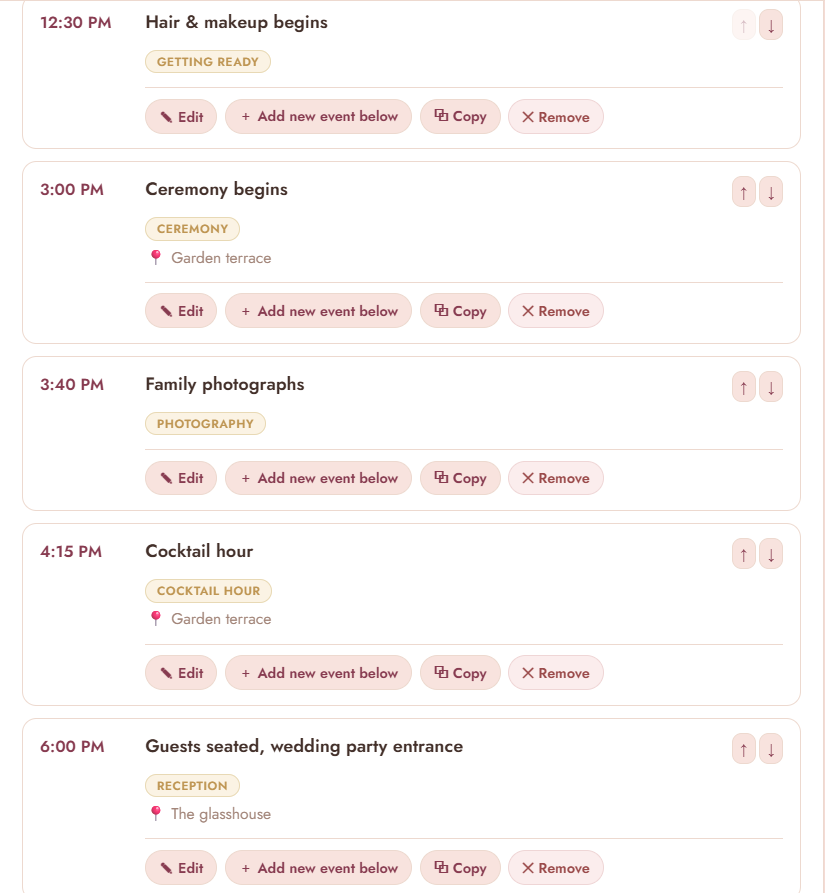
Build it in Ever AfterCreate and adjust the real sequence of the day, event by event.
The editable Ever After Wedding Day Run Sheet: hair and makeup at 12:30 PM, ceremony at 3:00 PM on the garden terrace, family photographs, cocktail hour and guests seated at 6:00 PM in the glasshouse, each with Edit, Add new event below, Copy and Remove
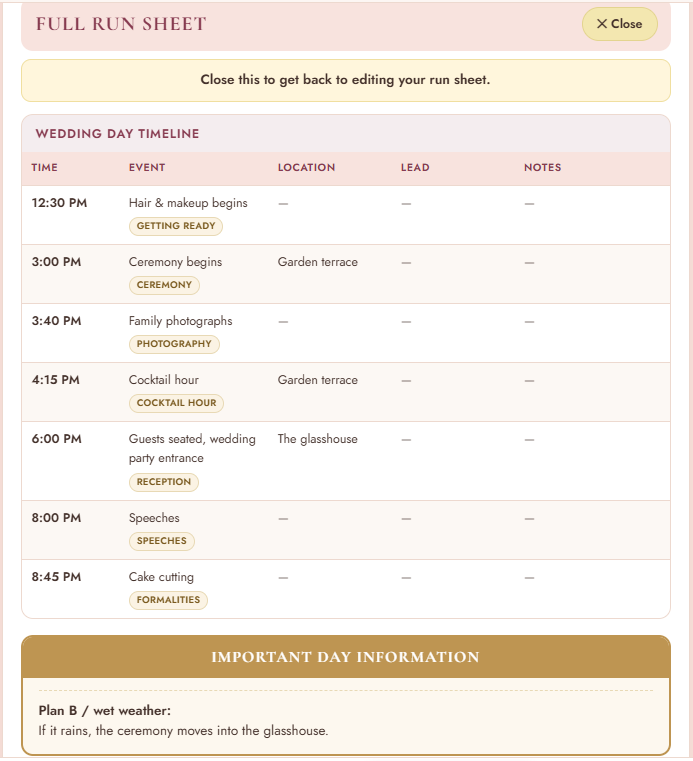
Hand over the finished run sheetPrint or save the Wedding Day Timeline so the venue, coordinator, MC, suppliers or wedding party can follow the plan.
Ever After Full Run Sheet: Wedding Day Timeline from hair and makeup at 12:30 PM to cake cutting at 8:45 PM, with location, lead and notes columns, and Important Day Information: if it rains, the ceremony moves into the glasshouse
Real bride-to-be feedback

★★★★★

“I honestly love it. There’s so much to think about when you’re planning a wedding, and Ever After just makes everything feel more organised. I can go in and see the checklist, budget, guest details, what I still need to do and all the wedding-day stuff without looking in five different places. It covers so many of the things you’re trying to keep track of, but it’s still really simple to use and makes everything feel much more manageable. I think it’s exceptional, and I’d definitely recommend it to anyone planning their wedding.”

— Olivia B. · Bride-to-be

Ready for one beautiful place to keep it all?

Your checklist, budget, guests, events, seating, vendors and wedding-day plans, organised instead of scattered.

US$19✦One-time purchase✦No subscription

Everything else

All the little things still matter. They all have a place.

Find your wedding style

Seven quick questions, one colour palette to guide the look. Save it to your Vision Board.
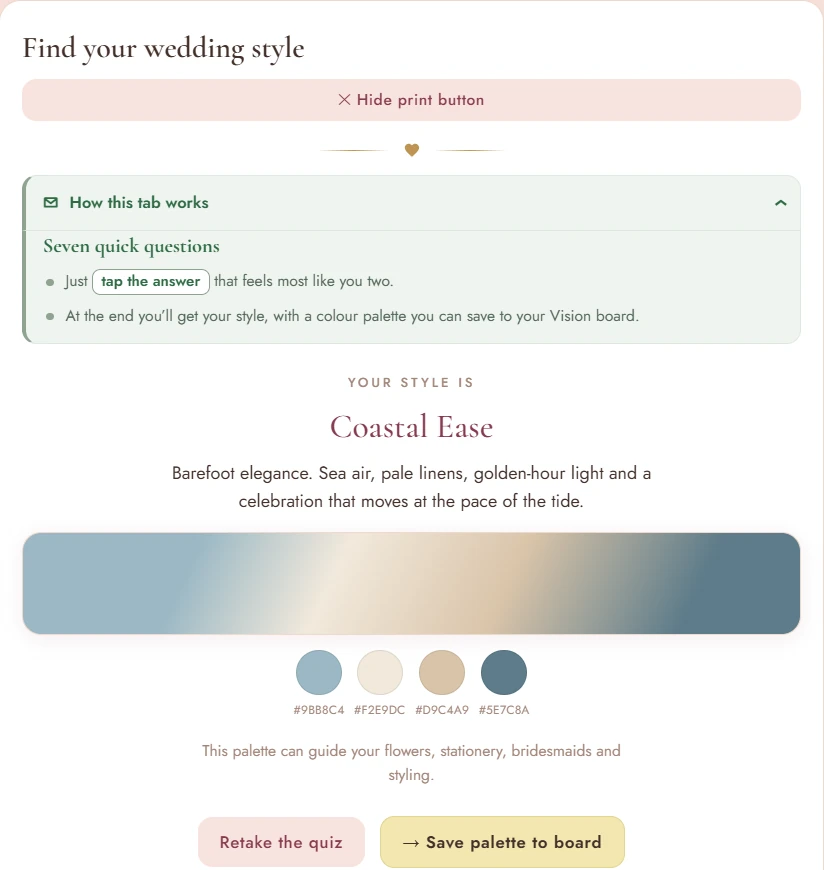
Ever After Style Quiz result: Coastal Ease, with a four-colour palette of sea blue, linen, sand and slate

“Where did I write that down?”

Notes that don’t get lost

Venue questions, reminders and late-night thoughts have one wedding-specific home.
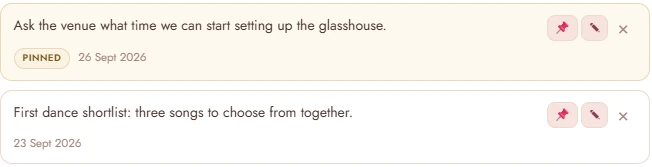
A pinned note to ask the venue about setting up the glasshouse, and a first dance shortlist

“Who gave us this, and have we thanked them yet?”

Gifts & thank-yous

Keep who gave what and who still needs a thank-you together.
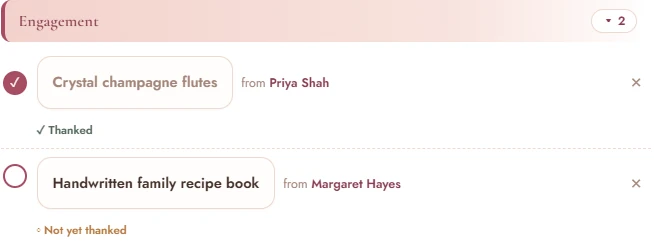
Crystal champagne flutes from Priya Shah, thanked, and a handwritten family recipe book from Margaret Hayes, not yet thanked

“What exactly do I need to give the venue?”

Ready for the people helping

Print or save the relevant guest, seating, budget or wedding-day information and hand over only what that person needs.

ChecklistBudgetGuest listsVendor contactsRun sheetDay contactsGift register

“Where’s everyone’s number when I need it?”

Wedding day contacts

Keep the people and booked suppliers you may need to reach on the day easy to find.

Try before you buy

See Ever After in action.

You’re invited to explore

The Wedding of

Sofia & James

Friday, May 28, 2027

The Linden Estate

Explore Sofia & James’s sample wedding and click through the real planner to experience how everything comes together.

Try the Free Demo

Sofia & James are an example couple.

Love Ever After? Stay in the loop.

Get wedding-planning tips, Ever After updates and useful inspiration from Grace & Pride.

Keep me updated
How it works

Three simple steps.

No subscription. No Ever After account to create. Simply use your Access Code to unlock the planner after purchase.

  1. 1

    Purchase Ever After

    A single, one-time purchase.

  2. 2

    Receive your Access Code

    Delivered after checkout.

  3. 3

    Start planning

    Open your planner, enter your code and begin.

Your privacy

Your plans stay with you.

Your wedding-planning information stays in your browser on your device, and in any backups you choose to make. Grace & Pride doesn’t keep your wedding plan in a cloud wedding account or wedding database.
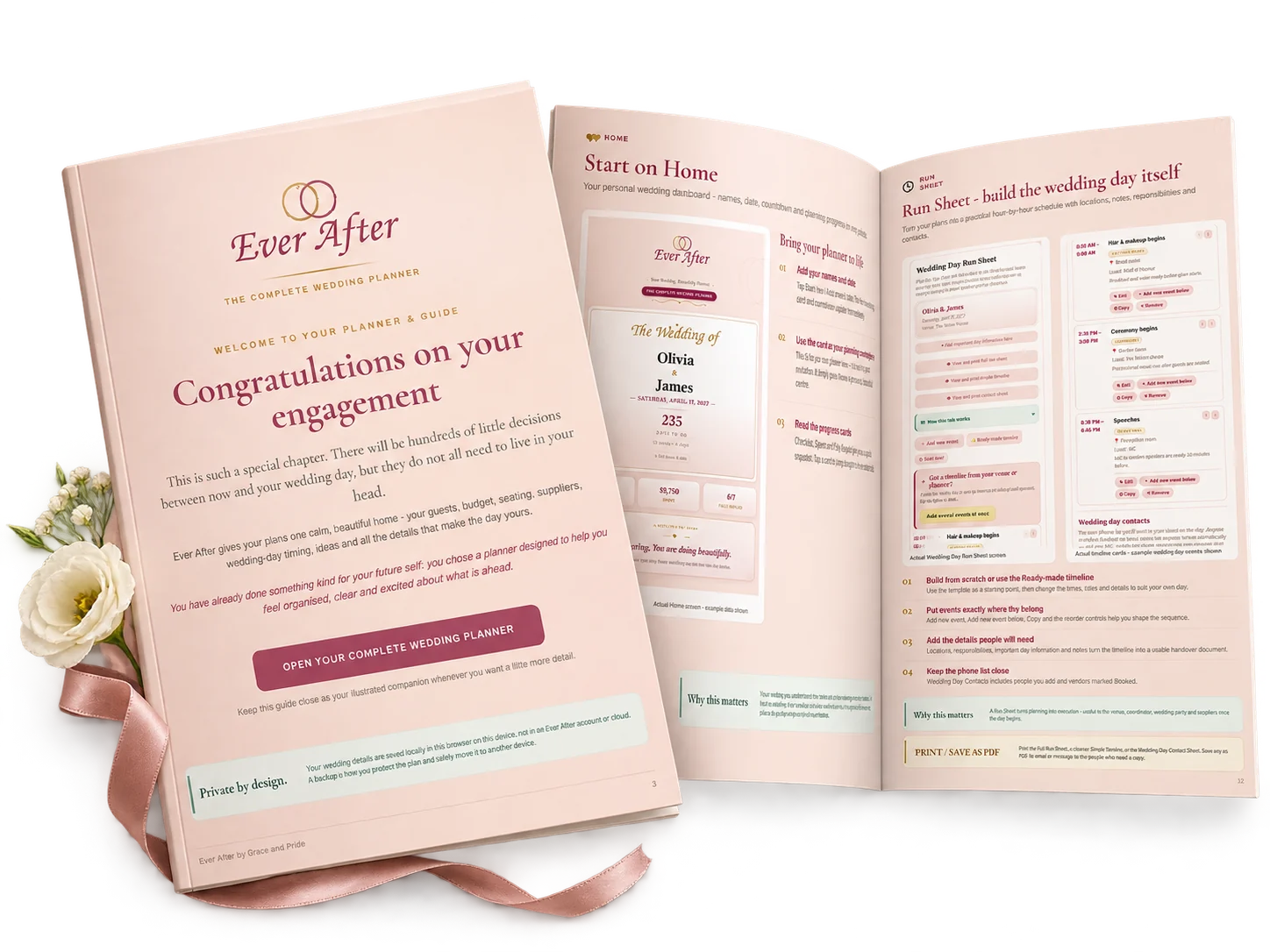
The illustrated Ever After Guide: the cover reading Congratulations on your engagement, and an open spread showing the Start on Home and Run Sheet pages

Your illustrated Ever After Guide is included.

A beautifully designed 22-page companion to your planner. It walks you through each area, shows you the real screens, and helps you make the most of everything Ever After can do.

What’s included

Everything you receive.

The planner

Ever After, The Complete Wedding Planner

Checklist, budget, guests and RSVPs, seating, vendors, run sheet, contacts, style quiz and vision board, gifts, notes and printable reports.

The companion

The illustrated 22-page Ever After Guide

Your step-by-step companion for getting started and making the most of every part of the planner.

Launch price

US$19

One-time purchase✦No subscription

  • Ever After, The Complete Wedding Planner
  • The illustrated 22-page Ever After Guide
  • Your Access Code, delivered after checkout
Get Ever After

Local currency is shown at checkout where available.

Want to explore first? Try the free demo.
Good to know

Questions, answered.

Is Ever After a subscription?

No. It’s a one-time purchase, with no monthly or yearly fees.

Does it work on my phone and computer?

Yes. Ever After opens in your web browser on a phone or computer. Your plan is saved on the device you’re using and doesn’t sync automatically, so choose one main device for planning.

Can my partner use it too?

Yes. Your purchase covers you and your partner, for one wedding. Plan together on your main device, or pass a backup between you and keep one copy as your main plan.

What happens if I change devices?

Make a backup on your current device, then use it to bring your plan into Ever After on the new one. Regular backups also protect your plan. Your Guide shows you how.

How is the demo different from the full planner?

The demo is the real planner, filled with Sofia & James’s sample wedding so you can explore before you buy. The full planner is yours to fill with your own wedding, unlocked with your Access Code, and comes with the illustrated 22-page Guide.

Your wedding has enough moving parts. Your planning doesn’t have to.

One beautiful place for the details, decisions and plans that make the day yours.

One-time purchase✦No subscription